Upgrading your truck's wheels is one of the fastest ways to change its stance, but getting the fitment right comes down to two numbers: offset and backspacing. Get these wrong and you're looking at rubbing fenders, stressed wheel bearings, or a set of wheels heading back in the box. Our wheel offset calculator takes the guesswork out of the equation. Below, you'll find the calculator itself, a breakdown of what offset and backspacing actually mean, a conversion chart, and guidance on choosing the right offset for lifted trucks and different fitment styles.
How To Use the Wheel Offset Calculator
Our wheel offset calculator gives you two tools in one: a clearance comparison calculator and a backspacing calculator. Whether you're swapping to a wider wheel or just double-checking that a new set will clear your suspension, you'll get the numbers you need in seconds. Just plug in your measurements, hit "Calculate," and the tool does the rest.
Wheel Clearance Calculator
A wheel clearance calculator shows you how much your new wheel will shift inward toward the suspension and outward toward the fender compared to your current setup. Here's how to use it step by step.
- Find your current wheel's width. Check the back of the wheel for a stamped size, look it up in your owner's manual, or search the manufacturer's website. Width is measured in inches (e.g., 8", 9", 10").
- Find your current wheel's offset. Offset is stamped on the back of most wheels as "ET" followed by a number (e.g., ET+20). If you can't find it, measure the distance from the wheel's centerline to the mounting surface in millimeters. For a deeper walkthrough, check out our guide on wheel offset explained in detail.
- Measure any spacers. If you're running wheel spacers, measure their thickness or find the listed spec. Enter this value so the calculator accounts for the extra gap.
- Repeat for your new wheel. Grab the width, offset, and spacer thickness for the replacement wheel you're considering.
- Enter everything and hit "Calculate." The result shows you how much further inward (toward suspension) and outward (toward or past the fender) your new wheel will sit compared to your current one.
This clearance comparison is the fastest way to tell whether a new wheel will fit your wheel well without rubbing on fender liners or suspension parts.
Wheel Backspacing Calculator
Need to know a wheel's backspacing before you buy? Use the backspacing calculator when a listing only shows width and offset but doesn't include the backspacing measurement.
- Enter the wheel's width in inches.
- Enter the wheel's offset in millimeters.
- Hit "Calculate" to get the backspacing value in inches.
Knowing backspacing tells you how far the wheel extends toward your suspension and brake components. It's especially useful when you're comparing aftermarket wheels that list specs differently — some brands lead with offset, others with backspacing. Our tire size calculator can help you pair the right tires once you've locked in your wheel specs.
Disclaimer: These calculations are estimates for informational purposes only. This calculator is not meant to provide exact measurements. Fitment may vary by vehicle.
What Is Wheel Offset?
Wheel offset is the distance in millimeters between a wheel's centerline and its mounting surface — the flat area where the wheel bolts to the hub. This single measurement controls how far inward or outward your wheel and tire combo sits relative to the fender, and it's one of the most important specs to get right when upgrading your truck's wheels.
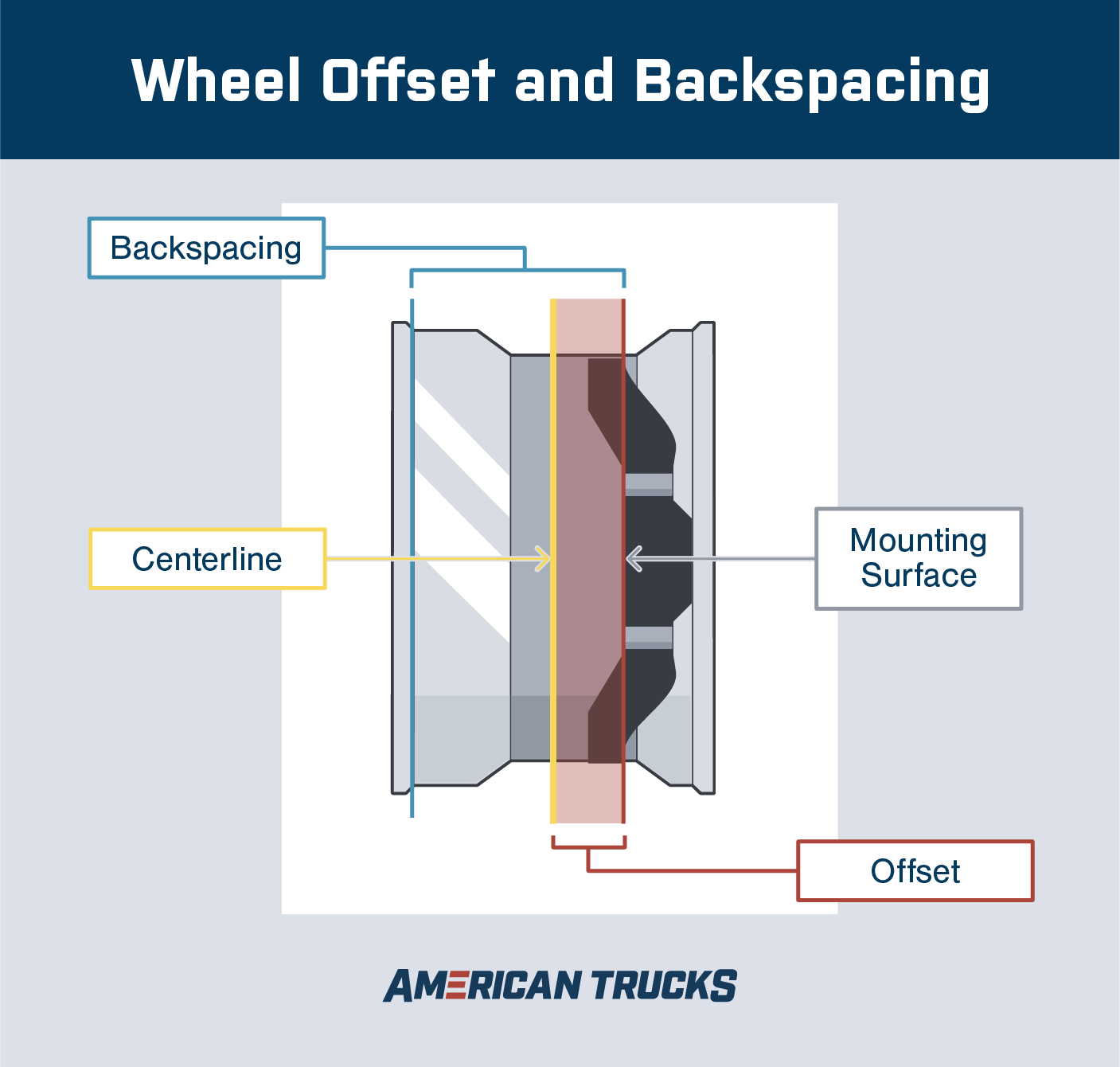
Every wheel has a centerline — an imaginary line splitting the wheel exactly in half across its width. The mounting surface is where your wheel meets the hub assembly. Offset measures how far that mounting surface sits from the centerline. This measurement is almost always stamped on the back of the wheel as "ET" (from the German Einpresstiefe) followed by a number, like ET+25 or ET-12.
Understanding offset helps you predict whether a wheel will tuck neatly inside the fender, sit flush, or push outward for a wider stance. For a deeper dive, we've got a full article on wheel offset explained in detail with an offset chart, and you can also browse our truck wheel guide for help choosing the right setup. If you want to explore different wheel styles, check out our breakdown of types of wheels.
Positive, Negative, and Zero Offset
Offset falls into three categories, and each one changes how your wheel sits in the wheel well:
- Positive offset (+): The mounting surface sits closer to the face (street side) of the wheel, pushing the wheel inward toward the suspension. Most stock trucks run positive offset because it keeps the tire safely inside the fender and maintains factory handling geometry. Common range: +15mm to +50mm.
- Negative offset (-): The mounting surface sits closer to the back (brake side) of the wheel, pushing the wheel outward past the fender line. This is the go-to for lifted trucks and aggressive stances because it widens your track width and gives you that "wheels sticking out" look. Common range: -12mm to -44mm.
- Zero offset (0): The mounting surface lines up exactly with the wheel's centerline. Zero offset is relatively flush with the fender on many trucks and sits between the tucked-in stock look and the pushed-out aggressive stance.
Negative offset on wheels means the mounting surface is shifted toward the inside of the wheel, which moves the entire wheel and tire assembly outward from the truck's body. The more negative the number, the further out the wheel extends. A wheel with -44mm offset will stick out significantly more than one with -12mm.
What Is Wheel Backspacing?
Wheel backspacing is the distance in inches from the wheel's mounting surface to its inner lip — the edge closest to your suspension and brake components. While offset tells you where the mounting surface sits relative to the centerline, backspacing tells you how far the wheel extends inward toward your truck's frame, calipers, and control arms.
Backspacing is measured in inches and is typically a smaller, more intuitive number than offset. For example, a wheel might have 4.5" of backspacing, meaning there are 4.5 inches of wheel depth between the mounting pad and the inner edge.
You can calculate backspacing from a wheel's width and offset using this formula:
Backspacing = (Wheel Width / 2) + (Offset in inches) + 0.5"
To convert offset from millimeters to inches, divide by 25.4. So for a 10"-wide wheel with +25mm offset:
- Offset in inches: 25 / 25.4 = 0.98"
- Backspacing: (10 / 2) + 0.98 + 0.5 = 6.48"
Backspacing matters most when you're checking whether a wheel will physically clear your brake calipers, tie rods, and other suspension parts. A wheel with too much backspacing can slam into those components on bumps or during turns. Too little, and it'll poke way out past the fender.
Wheel Offset vs. Backspacing: What's the Difference?
Offset and backspacing both describe where a wheel sits relative to your truck, but they measure from different reference points. Offset measures from the wheel's centerline to the mounting surface in millimeters. Backspacing measures from the mounting surface to the wheel's inner lip in inches. They're related — you can convert between them — but they answer slightly different questions.
- Offset tells you how the wheel is positioned relative to the fender. Use it when you're comparing wheels of the same width and want to know which one will poke out more or tuck in further.
- Backspacing tells you how much room the wheel needs on the suspension side. Use it when you're worried about clearance between the inner wheel lip and your brake calipers, control arms, or frame.
Here's the key thing to remember: two wheels can have the same offset but different backspacing if they're different widths. A 10"-wide wheel with +25mm offset has more backspacing than an 8"-wide wheel with +25mm offset because the wider wheel extends further inward.
For a deeper comparison, our offset vs. backspacing tech guide walks through more examples and conversion scenarios. Quick conversion example: Say you're looking at a 9"-wide wheel with -12mm offset. First, convert the offset: -12 / 25.4 = -0.47". Then apply the formula: (9 / 2) + (-0.47) + 0.5 = 4.53" backspacing.
Wheel Offset and Backspacing Chart
![]() Use this chart to quickly cross-reference a wheel's rim width and backspacing to find its offset in millimeters. Find your wheel width in the left column, then read across to the backspacing value closest to your wheel's spec. The number in the cell is the offset.
Use this chart to quickly cross-reference a wheel's rim width and backspacing to find its offset in millimeters. Find your wheel width in the left column, then read across to the backspacing value closest to your wheel's spec. The number in the cell is the offset.
|
Rim Width
|
3.5" BS
|
4.0" BS
|
4.5" BS
|
5.0" BS
|
5.5" BS
|
6.0" BS
|
6.5" BS
|
7.0" BS
|
7.5" BS
|
|
6"
|
0mm
|
+13mm
|
+25mm
|
+38mm
|
+51mm
|
+64mm
|
—
|
—
|
—
|
|
7"
|
-13mm
|
0mm
|
+13mm
|
+25mm
|
+38mm
|
+51mm
|
+64mm
|
—
|
—
|
|
8"
|
-25mm
|
-13mm
|
0mm
|
+13mm
|
+25mm
|
+38mm
|
+51mm
|
+64mm
|
—
|
|
9"
|
-38mm
|
-25mm
|
-13mm
|
0mm
|
+13mm
|
+25mm
|
+38mm
|
+51mm
|
+64mm
|
|
10"
|
-51mm
|
-38mm
|
-25mm
|
-13mm
|
0mm
|
+13mm
|
+25mm
|
+38mm
|
+51mm
|
|
11"
|
-64mm
|
-51mm
|
-38mm
|
-25mm
|
-13mm
|
0mm
|
+13mm
|
+25mm
|
+38mm
|
|
12"
|
-76mm
|
-64mm
|
-51mm
|
-38mm
|
-25mm
|
-13mm
|
0mm
|
+13mm
|
+25mm
|
How to read the chart: Find your rim width on the left. Move across the row to the column matching your wheel's backspacing. The value in that cell is the offset in millimeters. Positive numbers mean the wheel tucks inward; negative numbers mean it pushes outward.
This chart uses the standard conversion formula: Offset (mm) = (Backspacing - (Wheel Width / 2) - 0.5) × 25.4. Values are rounded to the nearest whole millimeter. Your actual wheel may vary slightly depending on the manufacturer.
Poke vs. Tuck: Understanding Wheel Fitment Styles
Poke and tuck describe how your wheel and tire combo sits relative to the fender — and they're the visual result of your offset, wheel width, and tire size choices working together. Here's what each fitment style looks like and how to achieve it.
- Poke: The wheel and tire extend past the fender lip. You'll see this on lifted trucks with wide, negative-offset wheels. It creates a bold, aggressive look but exposes the tire sidewall and can throw road debris onto the body. Poke is achieved with negative offset, wider wheels, or both. Many states require fender flares or mud flaps if your tires extend beyond the fender.
- Tuck: The wheel and tire sit fully inside the fender opening. This is the stock look on most trucks. Positive offset naturally tucks the wheel inward, and it's the safest option for daily drivers who don't want to worry about clearance. You won't get that wide-stance look, but you'll keep your factory handling and protect against road spray.
- Flush: The wheel face lines up right at the fender edge — no poke, no tuck. This is the sweet spot for truck owners who want a clean, filled-out look without going too aggressive. Flush fitment usually requires mild negative offset or zero offset depending on your truck's factory fender gap.
Your truck's lift height, tire size, and fender trimming all play into which style you can pull off. A leveled truck with a -12mm offset wheel might sit flush, while the same wheel on a 6" lift would tuck slightly because there's more fender clearance above it. If you're shopping for wheels to match a specific stance, browse our roundup of the best truck wheels to see what other owners are running.
How To Calculate Wheel Offset for a Lifted Truck
Calculating wheel offset for a lifted truck starts the same way as any fitment check — you still need your wheel width, desired offset, and backspacing. But a lift changes the equation because it creates more vertical clearance between your tires and the fender, opening up options for wider wheels and more negative offset than your stock suspension would allow.
Here's how lift height generally affects your offset options:
- Leveling kit (1"–2.5"): Raises the front to match the rear. You'll gain a small amount of extra clearance, typically enough to run a zero-offset or mild negative-offset wheel without rubbing. Most leveled trucks can handle 1"–2" wider wheels than stock.
- Mid-range lift (3"–4"): Opens up significantly more room. You can comfortably run -12mm to -25mm offset depending on tire size and whether you've trimmed fender liners. This is where the "aggressive but functional" zone starts.
- Full lift (5"–6"+): Gives you the most flexibility. Deep negative offsets (-25mm to -44mm or beyond) become possible, and you can fit considerably wider wheels and tires. At this height, the limiting factor shifts from fender clearance to suspension geometry — make sure your control arms and steering components can handle the wider track.
No matter how much lift you're running, always check inner clearance, not just outer. A wheel with aggressive negative offset might clear the fender but slam into the upper control arm at full turn or full droop. Use the clearance calculator above to compare your current setup against the new wheel, and account for the larger tires you're likely pairing with it.
If you're still deciding on a lift, check out our guide on how much it costs to lift a truck to budget your entire build. F-150 owners can also reference our guide on fitting the right wheels to your F-150 for model-specific recommendations.
How Does Wheel Offset Affect Handling and Safety?
Wheel offset directly affects your truck's handling, tire wear, and the stress placed on steering and suspension components. Running the wrong offset isn't just a cosmetic issue — it can create real drivability and safety problems over time.
Here's what can happen when offset is too far outside the safe range for your truck:
- Tire rubbing: Too much negative offset pushes the tire into the fender or fender liner on turns and bumps. Too much positive offset can cause the inner sidewall to contact the suspension or frame.
- Premature tire wear: When the wheel sits outside the designed contact patch geometry, the tire doesn't wear evenly. You'll see more wear on the inside or outside edges, and you'll replace tires sooner.
- Steering pull and feedback: Changing your truck's scrub radius — the distance between the steering axis and the tire's contact point — alters how the steering feels. Aggressive negative offset can make the wheel want to "self-steer" over bumps and ruts, and it increases kickback through the steering wheel.
- Wheel bearing stress: Pushing the wheel further from the hub increases the lever arm on your wheel bearings. Over time, this added load accelerates bearing wear and can lead to play, noise, and premature failure.
- Brake component clearance: Wheels with very low backspacing can sit dangerously close to brake calipers, especially on trucks with upgraded braking systems. Always verify inner clearance before mounting.
Your OEM offset is the safest baseline. Truck manufacturers engineer that number around the vehicle's suspension geometry, steering axis, and braking system. Staying within about 5mm of your factory offset on a stock truck keeps you well within safe territory. If you're going more aggressive — say, -20mm or beyond — make sure you've accounted for the tradeoffs with a lift, fender trimming, or aftermarket suspension components designed for a wider track width.
Ready to find wheels and tires that fit your truck? Explore our tire size calculator to make sure your tire dimensions match your new offset, then head to our truck wheel guide to shop wheels by your truck's year, make, and model. Whether you're going for a flush daily driver setup or a wide aggressive stance, getting offset right is the foundation of a clean, safe build.
Related Content
Looking for more fitment and wheel resources? Check out these related guides:
Frequently Asked Questions About Wheel Offset
Here are answers to the most common questions truck owners ask about wheel offset, backspacing, and fitment calculations.
What Is a Good Wheel Offset for a Truck?
A good wheel offset for a truck depends on the look and fitment you want. Stock trucks typically run +15mm to +50mm. For a flush look without modifications, zero to mild negative offset (-6mm to 0mm) works well. Aggressive stances with poke usually need -12mm to -44mm, paired with a lift or leveling kit to avoid rubbing.
How Do You Calculate Wheel Offset From Backspacing?
To calculate offset from backspacing, use this formula: Offset (mm) = (Backspacing − (Wheel Width ÷ 2) − 0.5) × 25.4. For example, a 9-inch-wide wheel with 4.5 inches of backspacing has an offset of approximately -13mm. The 0.5 accounts for the extra half-inch of rim flange beyond the bead seat.
What Does Negative Offset Mean on Wheels?
Negative offset means the wheel's mounting surface is positioned closer to the inside (brake side) of the wheel rather than the center. This pushes the entire wheel and tire assembly outward from the truck's body, creating a wider stance where the tires extend beyond the fender. The more negative the number, the more the wheel sticks out.
Is Wheel Offset the Same as Backspacing?
No. Wheel offset measures the distance from the wheel's centerline to its mounting surface in millimeters. Backspacing measures from the mounting surface to the inner lip of the wheel in inches. They're related and you can convert between them, but offset changes with wheel width while backspacing gives a direct inner-clearance measurement.
Can Wrong Wheel Offset Damage Your Truck?
Yes. Running an incorrect wheel offset can cause tire rubbing on fenders or suspension components, uneven tire wear, increased stress on wheel bearings, and altered steering feel. Over time, excessive offset deviation from your factory spec can accelerate wear on bearings, ball joints, and tie rod ends, leading to costly repairs.
What Wheel Offset Do I Need for a Lifted Truck?
Lifted trucks can handle more negative offset than stock because the lift creates additional fender clearance. A leveling kit typically supports zero to -6mm offset. A 3–4 inch lift opens up -12mm to -25mm. Lifts of 5 inches or more can accommodate -25mm to -44mm or beyond, depending on tire size and whether fender trimming is done.
What Is the Difference Between Poke and Tuck on Wheels?
Poke means the wheel and tire extend past the fender lip, achieved with negative offset and wider wheels. Tuck means the wheel sits entirely inside the fender opening, which is the stock look using positive offset. Flush fitment sits right at the fender edge with no poke or tuck, typically using zero or mild negative offset.
How Do I Measure My Wheel's Offset?
Remove the wheel from the truck and lay it face-down on a flat surface. Measure the total width of the wheel in inches, then measure the distance from the flat mounting surface to the outer lip. Subtract half the total width from the mounting surface measurement, then multiply by 25.4 to convert to millimeters. That's your offset.


![Wheel Offset Calculator and Backspacing Tool [With Offset Chart]](/globalassets/blog/hero_images/wheel-offset-caclulator-hero.jpg)